Imperia Online script & bot · Windows 10 & 11

Your Imperia Online empire, unlocked.

No more tedious clicking, no more worrying. Warden handles the repetitive part of Imperia Online for you: dungeon runs, NPC and barbarian raids, army training, festivals and taxes. You keep the strategy and the fun, and your phone rings the moment someone attacks.

7 days free · then the attack alarm stays free · no card needed
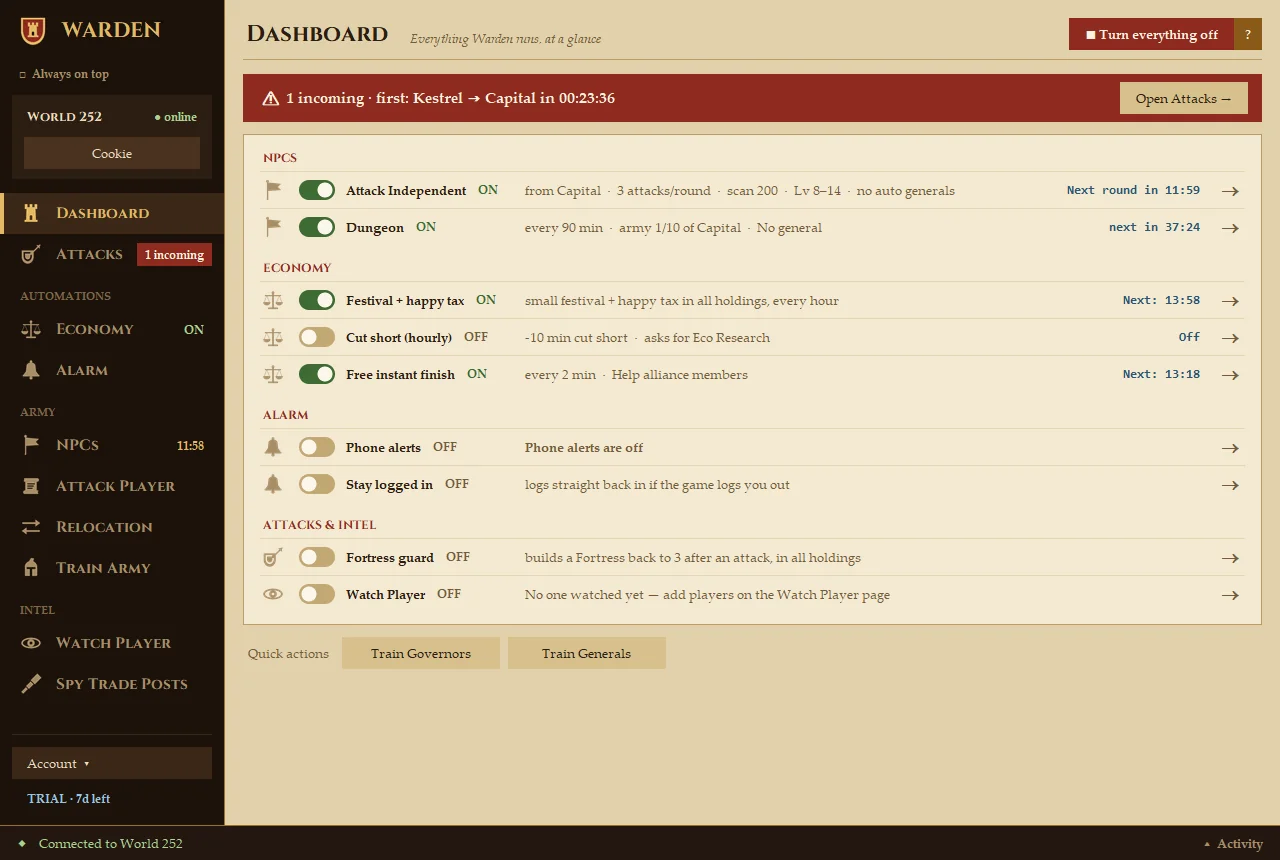
Warden, the Imperia Online script: Dashboard with the NPCs, Economy and Alarm switches
At a glance

Everything that eats your evenings, handled

Turn on only what you want. Every automation starts off each time Warden opens and runs at a careful, human pace.

Feature tour

A look inside Warden

Real screenshots of the app. Click any of them to see it full size. The Guide explains every button.

Dashboard

The main switches of Warden in one place, so you can see at a glance what's running.

  • Turn the dungeon, NPC raids, festivals, cut-short and the alarm on or off from here.
  • The line under each switch sums up its settings, such as every 90 min · army 1/5 of Capital.
  • Nothing runs until you switch it on, every time Warden opens.
Dashboard in the guide
Dashboard page

Economy

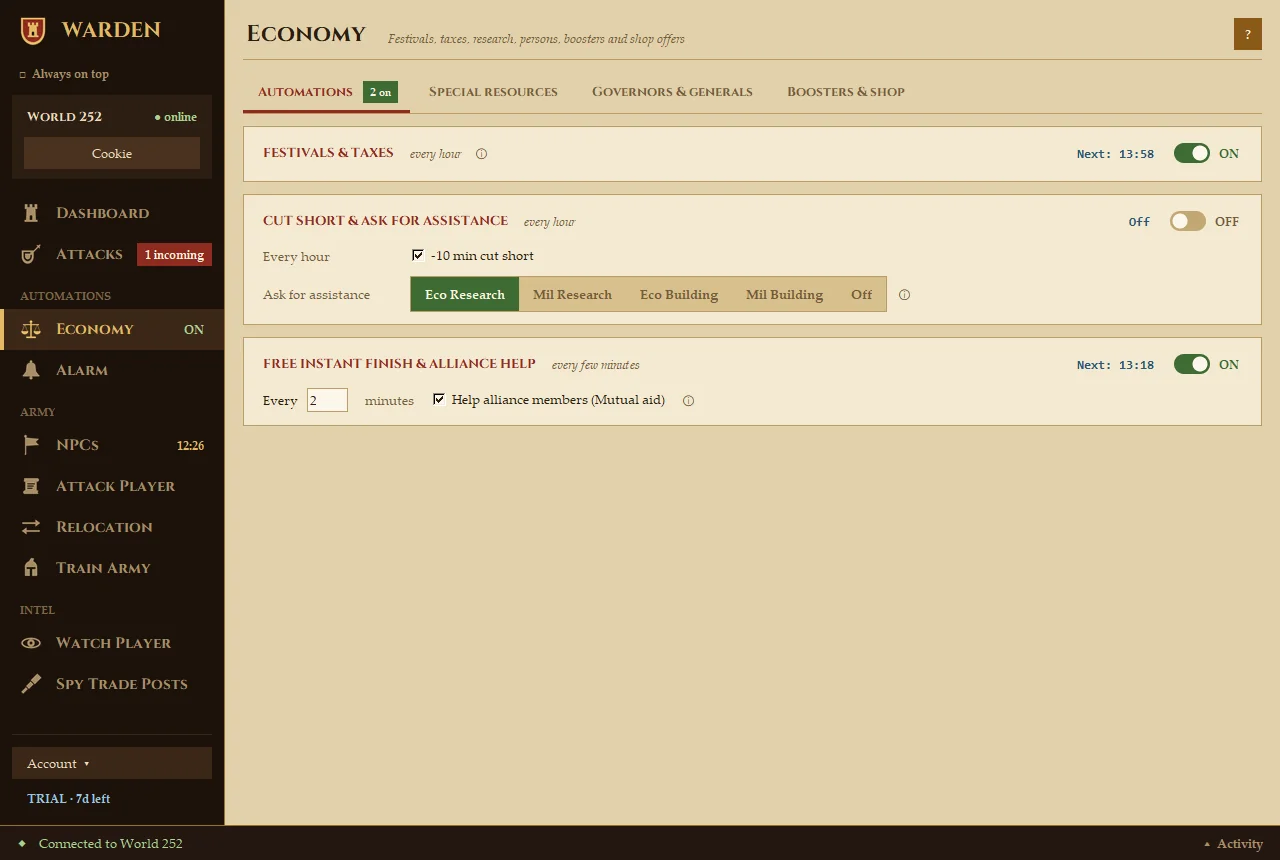
Everything that grows your realm, on a timer.

  • Festival + happy tax: a small festival and the happy tax in all holdings, every hour.
  • Cut short: uses the free −10 min, asks your alliance for help and helps every ally who asks.
  • Free instant finish: presses the free Instant construction every few minutes.
  • Governors & generals: spends every level-up, picking talents by your own ranking.
  • Gem train: hundreds of instant governor and general trainings with diamonds, in one press.
  • Boosters, shop discounts in every world, and a special-resource scan. None of it spends diamonds unless the button says so.
Economy in the guide
Economy page

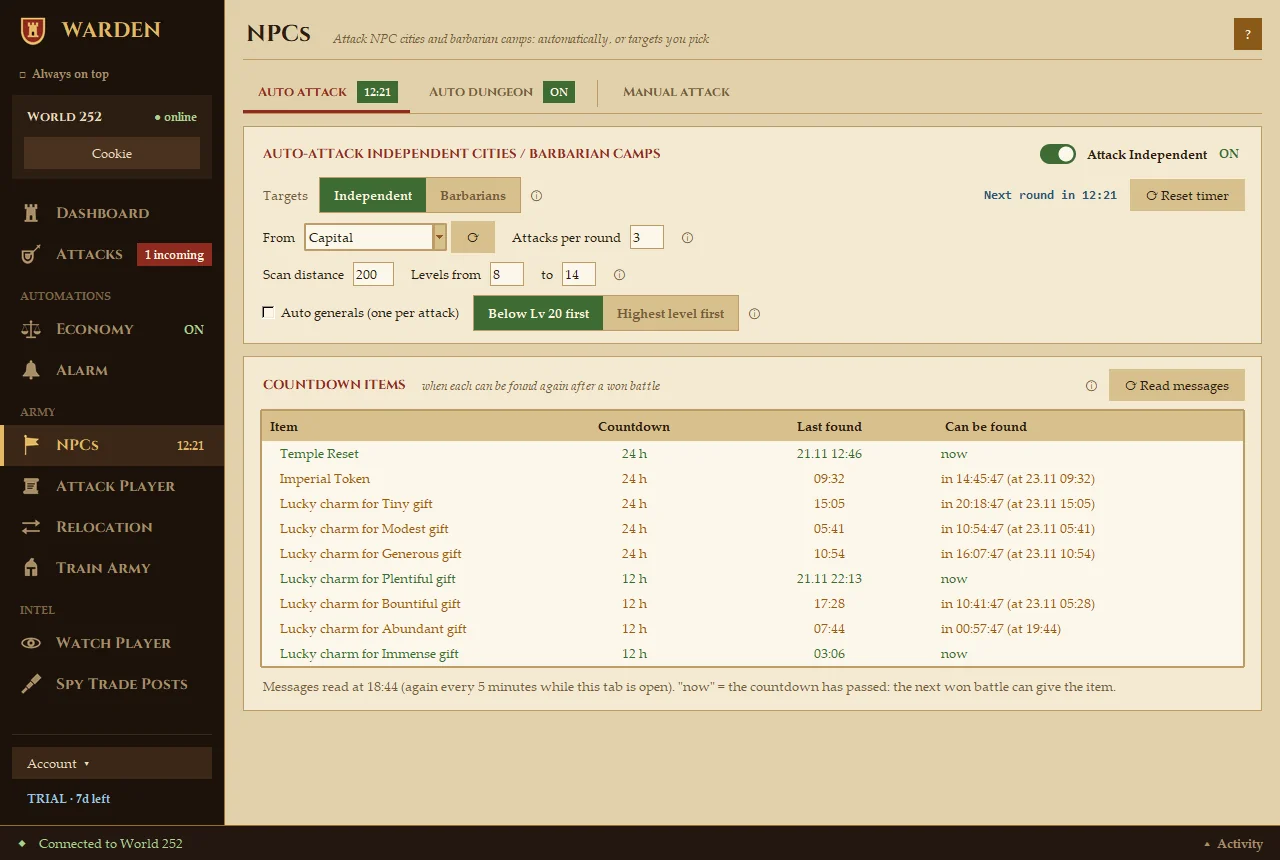
NPCs · Auto attack

Attacks that repeat by themselves while Warden is open.

  • Dungeon: sends the share of the Capital's army you choose, every 90 minutes or however often you set.
  • NPC raids: waits for the army to come home, rescans the map, then attacks the nearest independent cities or barbarian camps in your level range, skipping ones that are too strong.
  • Split the army over several attacks per round and let Warden put a general at the head of each.
  • Countdown items: see when the Temple Reset, the Imperial Token and each lucky charm can be found again after a won battle.
NPCs in the guide
NPCs page, Auto attack tab

NPCs · Manual attack

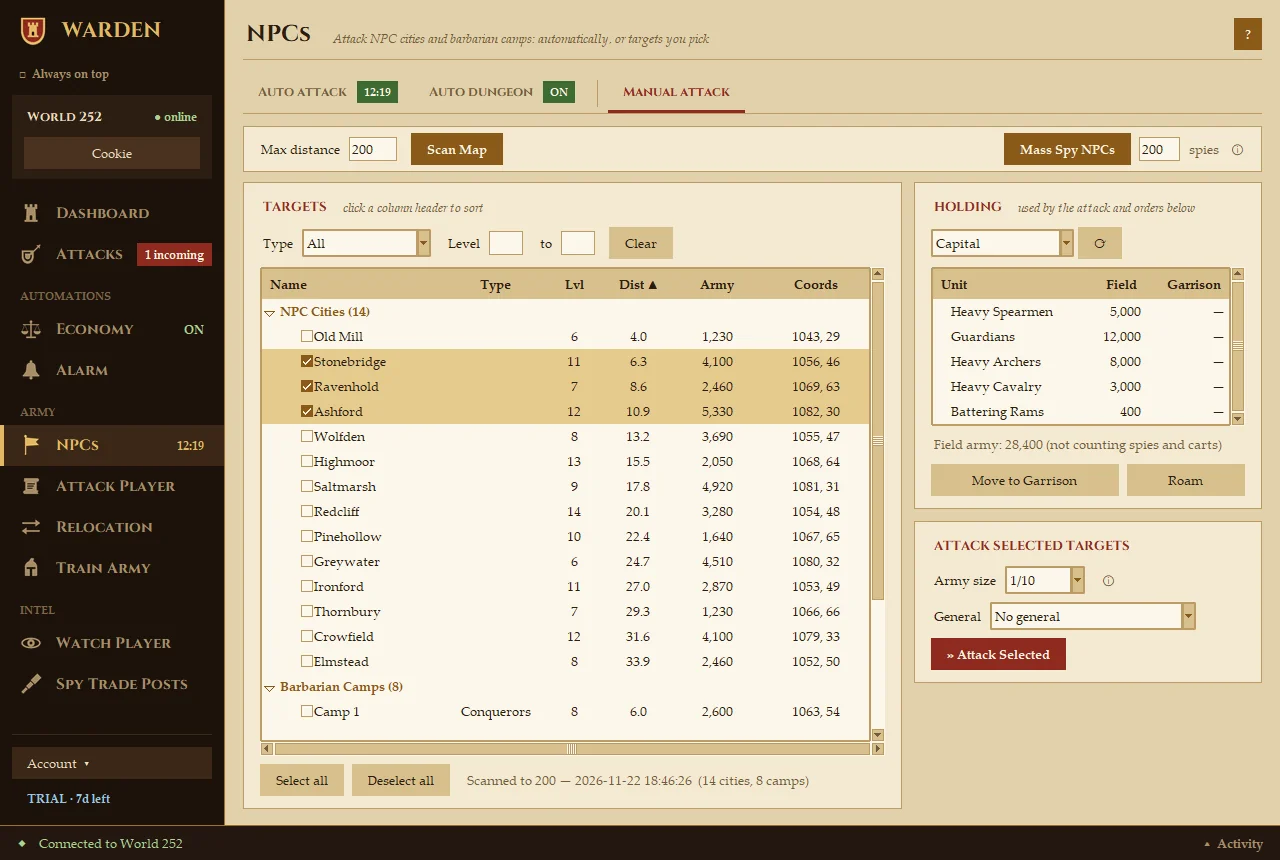
Find NPC targets on the map and attack or spy on them yourself.

  • Scan Map loads every NPC city and barbarian camp within the distance you choose.
  • Filter by type and level, and sort by distance, army or level.
  • Select several targets and the army is split evenly between them. Mass Spy sends one spy to each nearby city.
  • See the army in every holding, and move it into the garrison or send it roaming.
Manual attack in the guide
NPCs page, Manual attack tab

Attack Player

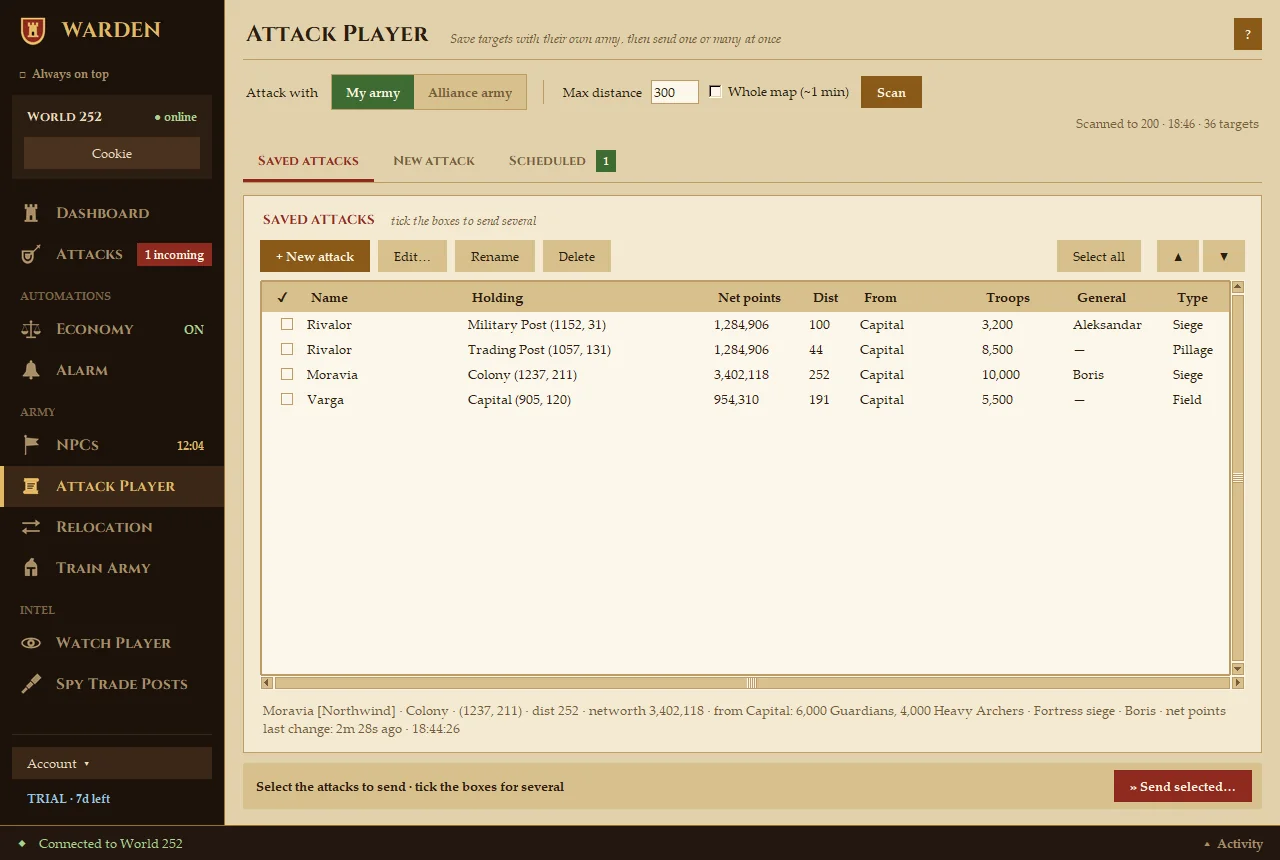
Find every holding of any player on the map and attack it, now or at a set time.

  • Scanner reads every holding on the map, up to a distance or the whole map.
  • Pick a player and all their holdings are listed, also outside your x5 points range.
  • Save each target with its own army and general, then send one or many at once: one a second, at your own delay, or random.
  • Schedule arrival: pick the date and time the first attack lands. Its travel time is read from the game, nothing extra is sent.
  • Or pick when it leaves: Leave at sends it at a set time.
Attack Player in the guide
Attack Player page

Relocation

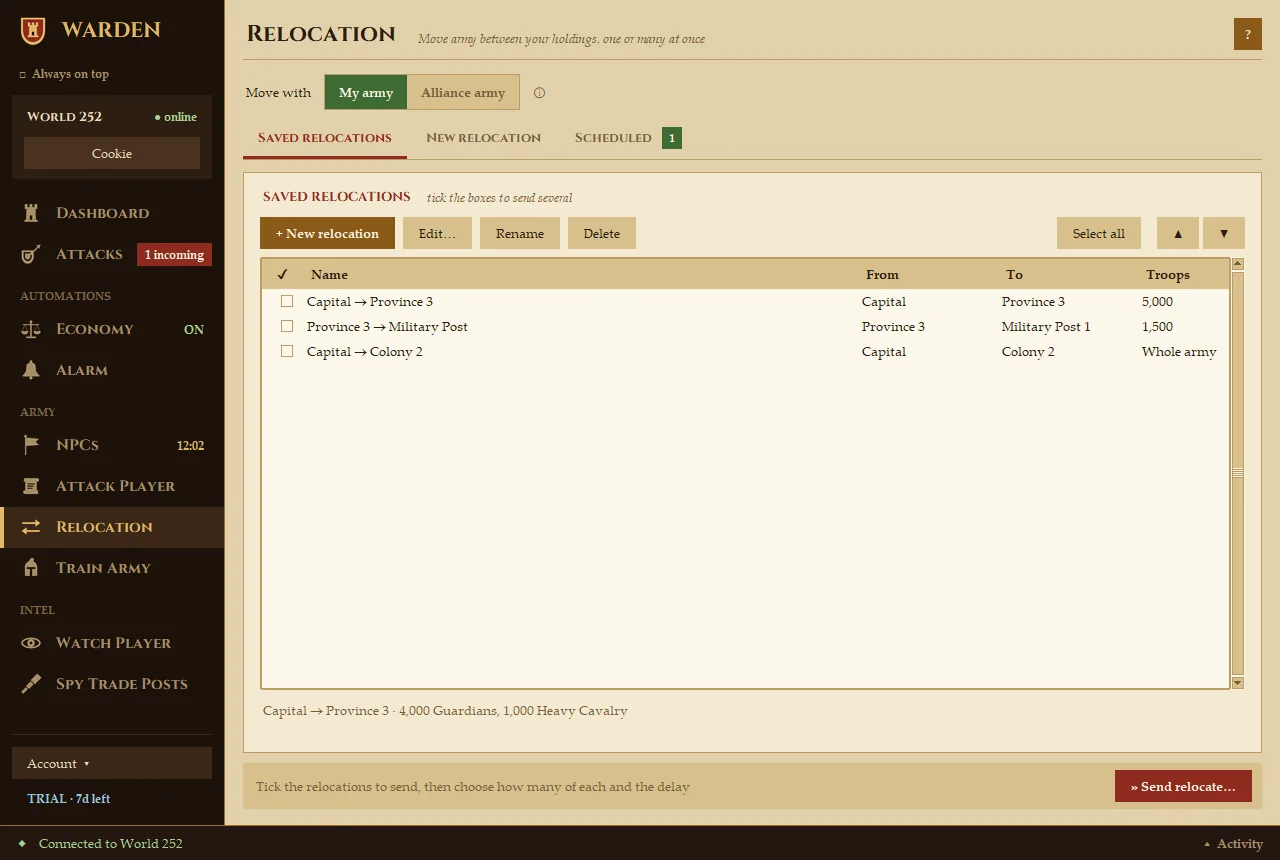
Move your army, or the alliance army, between holdings, one or many moves at once.

  • Save routes with their army and send them in batches, one a second or as fast as possible.
  • Schedule arrival lands the first move at the time you pick.
  • Enemy attack time sets it to land with the next attack on that holding.
Relocation in the guide
Relocation page

Train Army

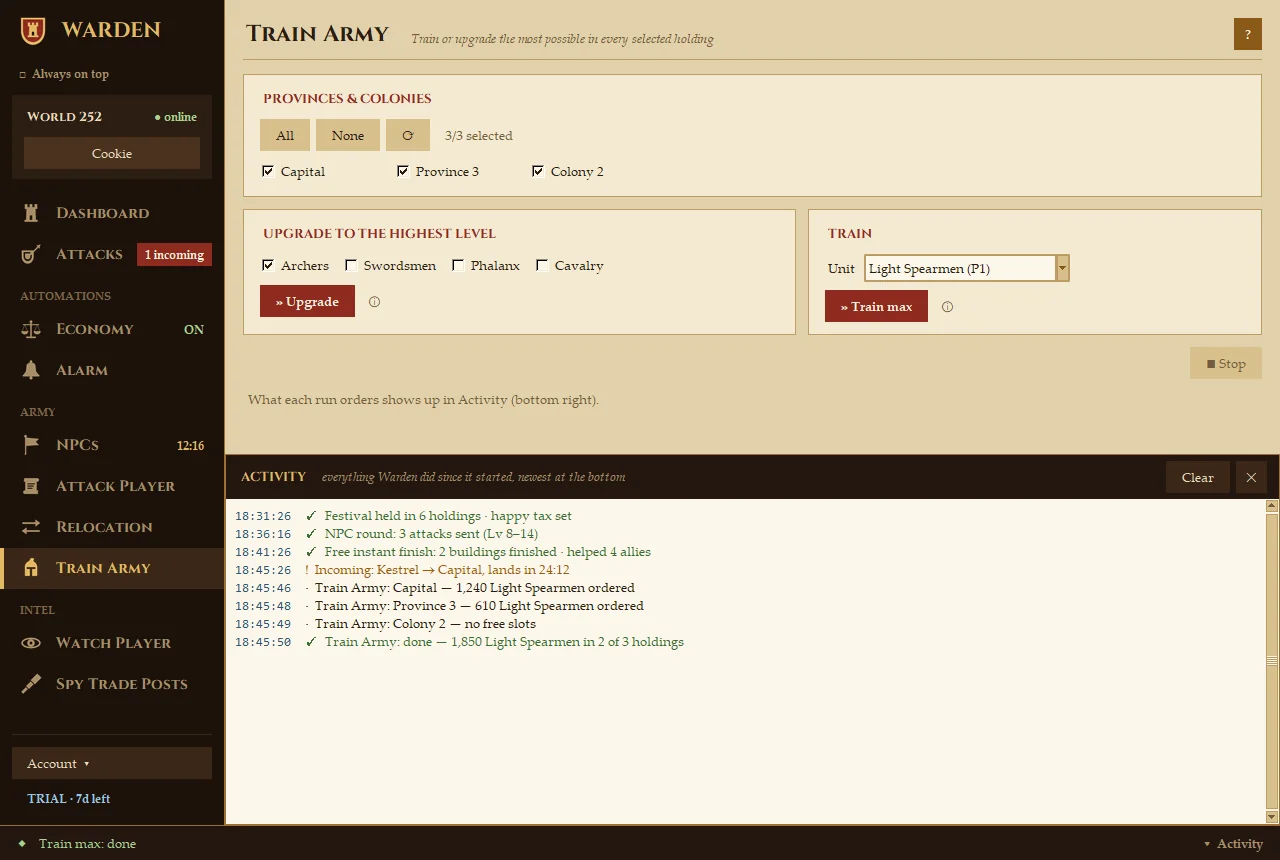
Train or upgrade as much as possible in many holdings with one press.

  • Tick the provinces and colonies to work on.
  • Upgrade turns every lower level of a unit type into the best one you've researched.
  • Train max fills every free slot that your resources allow.
Train Army in the guide
Train Army page

Attacks & Missions

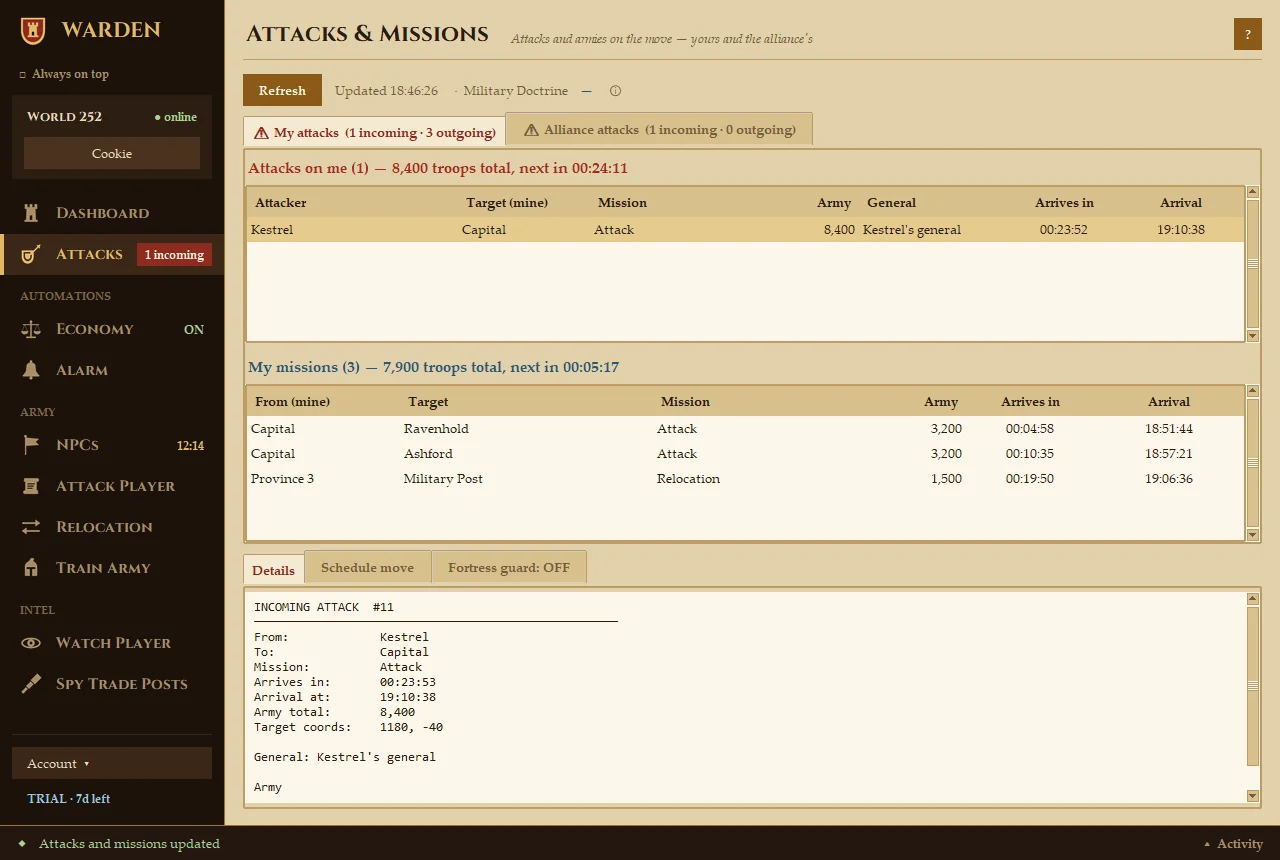
Every army on the move: attacks on you and your alliance, and your own missions.

  • Live countdown to each arrival, with troop totals.
  • Click a row for the details. The sidebar shows how many attacks are coming at you.
  • Refreshes by itself while the alarm is on.
  • Schedule move: the moment a mission lands in your holding, its army moves on to the holding you pick.
  • Fortress guard: when a siege takes a Fortress down to level 2, Warden builds it back to 3 with the free instant finish.
Attacks in the guide
Attacks and Missions page

Spy Trade Posts

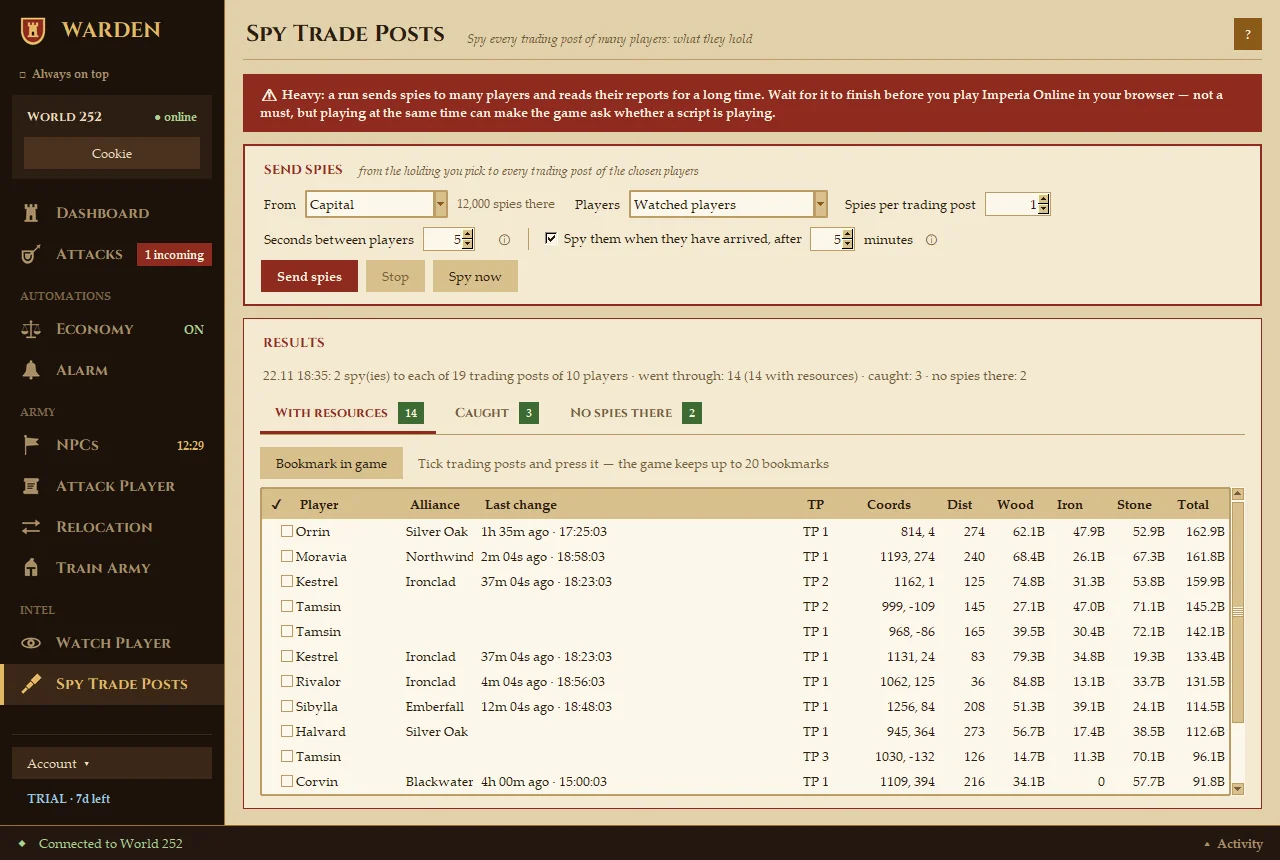
Send spies to every trading post of the players you watch, or of the whole world, and see what each post holds.

  • Pick the holding they leave from, how many spies go to each post and how far apart the players are sent.
  • Warden presses Infiltrate all once the spies have arrived.
  • The posts with resources are listed biggest first, with wood, iron and stone. Bookmark them in the game with one press.
Spy Trade Posts in the guide
Spy Trade Posts page
Gem Train

Hundreds of gem trainings in one press

Gem training in the game means pressing start and finish over and over. Pick who to train, say how many times, and Warden does every round for you.

Gem Train in Warden: governor and general pickers, the Gem Train button and the number of trainings
Attack alarm

Sleep. Warden keeps watch.

When you or your alliance get attacked, your phone rings until you react, even at night and even on silent. For each kind of attacker you choose whether it's ignored, a notification or a full alarm.

  • Stay logged in: if the game logs you out, Warden logs straight back in and keeps the PC awake.
  • It also tells your phone when Warden itself turns on or off, so you know it's still watching.

ntfy

Android

Bark

iPhone

Pushover

Android & iPhone

Set up the alarm

Getting started

Running in three minutes

Warden is a Windows app. It runs on your PC and talks to the game just like your browser does.

Install

Download and run the installer. No admin rights needed. Your 7-day trial starts when Warden first connects to the game.

Connect

Add the Warden Connect extension to Chrome, Edge or Firefox and click Connect Warden on the game page. Or paste your game's session cookie, or log in with your password. Step-by-step pictures.

Switch on

Turn on the automations and the phone alarm you want, then walk away.

Your account

Is it safe?

Your login stays on your PC

Your password is stored encrypted in Windows Credential Manager. We never see it. Our server only gets your licence key and an anonymous ID of your PC.

Careful by design

Every automation starts off, runs at a human pace and never spends diamonds unless the button clearly says so.

Your choice, your risk

Automation tools may be against the game's rules. Warden plays carefully, but we can't promise the game won't act against accounts that use it.

Pricing

Try it free. Keep it cheap.

One plan with everything. Cancel anytime. It keeps working until the end of the period you paid for.

Warden Free

€0
forever
  • Attack alarm on your phone
  • Every feature for 7 days, from your first connect
  • No card, no account
Download

Warden Pro

€5.99 /month
billed monthly
  • Every feature, all your worlds
  • Any number of PCs
  • Updates included
  • Cancel anytime
Start free, upgrade in the app

Prices include VAT. You subscribe from inside Warden (licence badge, bottom-left) with secure payment by Stripe. Buying during the trial keeps your remaining free days: you're only charged when they run out, and Warden turns Pro by itself. Your licence key is e-mailed to you too, for your other PCs.

FAQ

Questions

Is Warden an Imperia Online script, a bot or a browser extension?

Warden is an Imperia Online script and bot in one Windows app. It isn't a browser extension, a Tampermonkey userscript or an auto-clicker: it doesn't move your mouse or need the game open. It talks to the game the same way your browser does, so you can keep playing in the browser while it works.

Is the free trial really free?

Yes. 7 days, every feature, no card and no sign-up. The 7 days start the first time Warden connects to your game, not when you install it. After that, the phone attack alarm stays free for good.

How do I subscribe?

Inside Warden: click the licence badge in the bottom-left corner → Subscribe, pick monthly or yearly, and pay on the secure Stripe page. Warden turns Pro by itself a few seconds later. If you subscribe during the free trial, you keep the days you have left: the first charge only happens when they run out.

What is the "cookie" and why does Warden ask for it?

It's the ID of your game session in the browser (called PHPSESSID). Pasting it into Warden lets the app and your browser share one session, so you can keep playing in the browser while Warden works. The guide shows where to find it. You can also log in with your username and password instead. The Warden Connect extension for Chrome and Edge hands it over in one click.

Is my game password safe?

Your login stays on your PC, encrypted in Windows Credential Manager. Warden talks only to the game servers and to our licence server, which receives just your licence key and an anonymous ID of your PC.

Can my account get banned?

Automation tools may be against the game's rules. Warden paces its requests like a careful player, but we can't promise the game won't act against accounts that use it. You use Warden at your own risk.

Does my PC need to stay on?

Yes. Warden runs on your PC. With "Stay logged in" on, it keeps Windows from sleeping while it watches (the screen can still turn off).

Which languages does Warden speak?

English, Bulgarian, German, Greek, Spanish, French, Italian, Polish, Portuguese, Romanian, Russian and Turkish. Change it in the account menu at the bottom-left → Language.

How many PCs can I use?

As many as you like. A subscription links to your Imperia Online account and works in all of its worlds. It's linked when Warden first connects. Playing another account? Licence badge → Change account… (any time; it works on one account at a time).

How do I cancel?

Anytime: in Warden, click the licence badge → Manage subscription, or use the Account page with your licence key. Warden keeps working until the end of the period you paid for.

Is there a Mac version?

Not yet. Warden is Windows only for now.

I lost my licence key.

It's in the e-mail you got after subscribing. Or get it sent again on the Account page.
Download

Start your free trial

Windows 10 & 11 (64-bit). The 7 days start when Warden first connects to your game.

Download Warden for Windows

Windows may say "Windows protected your PC" for new apps. Click More info → Run anyway. Then follow Connect to the game.